

![How to Upscale Product Photos for E-Commerce: Complete Guide [2026]](https://xqysaylskffsfwunczbd.supabase.co/storage/v1/object/public/blog-images/2026/02/1769972712890-featured.webp)
How to Upscale Product Photos for E-Commerce
Your product photos are doing the selling for you. When someone lands on your listing, they cannot touch the item, turn it over, or feel its weight. All they have is the image. And if that image looks pixelated, grainy, or small, you have already lost the sale.
Most online sellers face this problem: supplier photos are low resolution, phone shots are too compressed, or images cropped from larger compositions leave you with 300px thumbnails that look terrible when zoomed.
AI upscaling fixes this. You can take that tiny supplier photo and turn it into a crisp, detailed image that looks professional on any screen.
Why Product Photo Quality Matters
Consumers make snap judgments. Research from Stanford found that 75% of users judge a company's credibility based on their website design, and product images are the centerpiece of any e-commerce page.
Here's what happens with low-quality product photos:
- Higher bounce rates since shoppers leave within seconds
- Lower conversion rates because blurry images signal low quality products
- More returns when the actual product does not match the pixelated preview
- Poor marketplace rankings since Amazon and eBay favor listings with quality images
The fix is not expensive photography equipment. The fix is making the most of the images you already have.
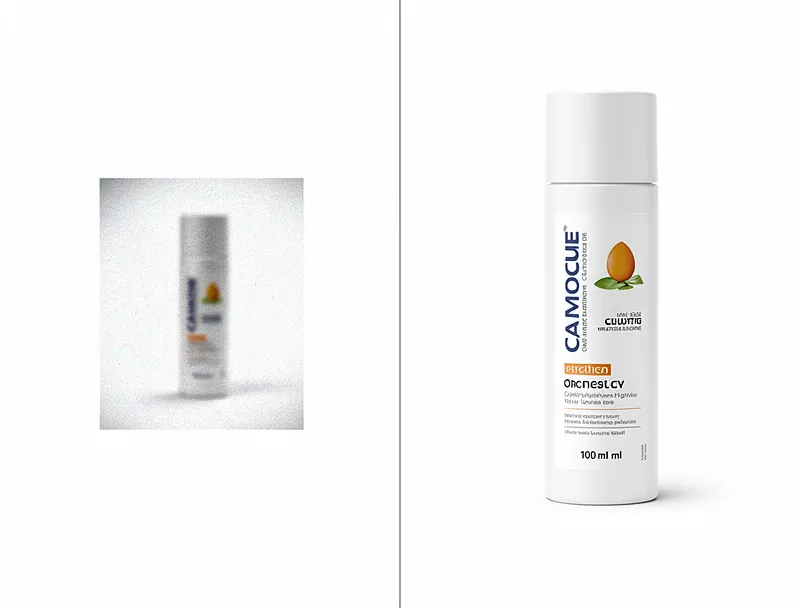
What Is AI Image Upscaling?
Traditional image resizing just stretches pixels. Make a 400px image into 1600px and you get a blurry mess. The software is guessing, filling in gaps with averaged colors.
AI upscaling works differently. Neural networks trained on millions of images can actually predict and generate missing detail. They recognize patterns like fabric textures, edge definition, and surface materials, then reconstruct them at higher resolution.
The result is an image that looks like it was shot with a better camera, not stretched in Photoshop.
Platform Image Requirements
Every marketplace has minimum image specs. Fall below them and your listings get suppressed or rejected.
| Platform | Minimum Size | Recommended |
|---|---|---|
| Amazon | 1000x1000px | 2000x2000px |
| eBay | 500x500px | 1600x1600px |
| Etsy | 2000x2000px | 2000x2000px |
| Shopify | 2048x2048px | 2048x2048px |
| WooCommerce | Varies | 1200x1200px |
If your source images are below these thresholds, upscaling is your only option besides reshooting everything.
How to Upscale Product Photos Step by Step
The process takes about 30 seconds per image:
Step 1: Prepare Your Source Image
Start with the highest quality version you have. If you have the original file from your supplier or photographer, use that instead of a compressed JPEG from email.
Step 2: Choose Your Target Size
For most e-commerce platforms, 2x or 4x upscaling hits the sweet spot. Going from 500px to 2000px (4x) gives you enough resolution for zoom features without creating unnecessarily large files.
Step 3: Upload and Process
Upload your product photo to MyImageUpscaler and select your enhancement level. The AI handles the rest.
Step 4: Download and Use
Your upscaled image downloads as a high-quality file ready for your product listings.

Best Practices for E-Commerce Photos
Upscaling helps, but starting with decent source material helps more. Here are tips that work:
Clean backgrounds sell better. White or light gray backgrounds are standard for a reason. They focus attention on the product and match platform guidelines.
Multiple angles reduce returns. Customers want to see the front, back, side, and any important details. AI upscaling works on all of them.
Consistent lighting across listings. If one product photo is warm-toned and another is blue, your store looks amateur. Upscaling cannot fix color inconsistency, so address that first.
Show scale when it matters. A photo of a bag next to a coin tells customers more than a standalone shot. These context images benefit from upscaling too.
Common Mistakes to Avoid
Over-upscaling: Going from 200px to 4000px asks too much. The AI can fill gaps, but it cannot invent detail that was never there. Stick to 4x maximum for best results.
Ignoring compression: If your source image has heavy JPEG artifacts (those blocky patterns), upscaling might enhance them. Start with the least-compressed version available.
Skipping the preview: Always check your upscaled image before publishing. Occasionally the AI misinterprets a pattern or texture. A quick look catches these issues.
Using watermarked images: This should be obvious, but upscaling a watermarked supplier image does not remove the watermark. It just makes it bigger and clearer.

Mobile Matters More Than Ever
Over 70% of e-commerce traffic now comes from phones. On mobile screens, image quality is even more critical because users zoom, pinch, and swipe constantly.
A 500px product photo might look acceptable in a desktop thumbnail. On a phone, when someone pinches to zoom on that button detail or fabric texture, it falls apart instantly.
Upscaled images hold up to mobile scrutiny. The detail is actually there when customers look for it.
ROI of Better Product Photos
The math is simple. If better product images increase your conversion rate by even 0.5%, the return is massive at scale.
Say you get 10,000 monthly visitors with a 2% conversion rate (200 sales) and $50 average order value ($10,000 monthly revenue). Bumping conversion to 2.5% means 250 sales and $12,500 monthly revenue. That is an extra $2,500 per month from the same traffic.
Image upscaling costs almost nothing compared to that return.
Batch Processing for Large Catalogs
If you have hundreds or thousands of SKUs, manual upscaling is impractical. MyImageUpscaler supports batch processing for exactly this situation. Upload multiple images and process them in one go.
For enterprise sellers with massive catalogs, API integration lets you automate the workflow entirely. New supplier images can be automatically upscaled before going live.
When to Reshoot Instead
Upscaling is not a replacement for photography. It is a tool for improving what you have. In some cases, reshooting makes more sense:
- Images with major composition problems (wrong angle, bad cropping)
- Severely damaged or corrupted source files
- Products where texture is the main selling point (fabrics, leather goods)
- High-ticket items where professional photography is expected
For everything else, the bulk of typical e-commerce inventory, AI upscaling delivers professional results from ordinary source material.
Getting Started
You can test AI upscaling right now with no account or payment required. Try the free upscaler on one of your product photos and see the difference yourself.
Better product images lead to more sales. The technology exists. The question is whether your competitors will adopt it before you do.
Frequently Asked Questions
Quick answers for this guide
How do I upscale product photos for e commerce []?+
Learn how to upscale product photos for your online store. Better images mean more sales. Free AI upscaler included. Start with the highest-quality source file available, choose the smallest upscale factor that meets your target size, and inspect the result at 100% before publishing or printing.
When should I use AI upscaling for this workflow?+
Use AI upscaling when the original image is too small for the target use case but still has enough detail to guide the model. For guides work, pay closest attention to source image quality, upscale settings, output dimensions, and final visual inspection, especially ecommerce, product-photos, upscale.
How do I avoid losing quality after upscaling?+
Upscale once from the best original, avoid repeated compression, keep important text and edges sharp, and export in a format that matches the final use. If the output shows halos, smeared texture, or distorted text, reduce the upscale factor or use a cleaner source image.

Reviewed byJoao Furtado
AI Image Upscaling Specialist
Joao is the founder of MyImageUpscaler and an AI image upscaling specialist. He tests every guide against real upscaling workflows — comparing model outputs, evaluating sharpness and artifact tradeoffs, and validating tool recommendations before publication.
- AI image upscaling
- Model comparison
- Photo restoration
- E-commerce image prep
![Upscale Image Online Free — No Sign Up, No Watermarks [2026]](https://xqysaylskffsfwunczbd.supabase.co/storage/v1/object/public/blog-images/2026/02/1771797822106-featured-online-upscaler.webp)