![Free AI Photo Enhancer Online — No Sign Up Required [2026]](https://xqysaylskffsfwunczbd.supabase.co/storage/v1/object/public/blog-images/2026/03/1773522866013-free-enhancer-featured.webp)
Free AI Photo Enhancer: Enhance Images Online Without Signing Up
A free AI photo enhancer that works without signup — no account, no watermarks, no fuss. Just upload your photo and get a sharper, cleaner version back in seconds.
Most free tools make you jump through hoops. Create an account. Verify your email. Enter a credit card. Then hit you with a watermark anyway.
This guide shows you which tools actually deliver — and why MyImageUpscaler is the one most people end up using.
Why You Need a Free Photo Enhancer (Without the Friction)
Low-quality photos are everywhere. A product shot taken in bad lighting. An old family photo scanned at low resolution. A portrait that looked fine on your phone but blurry when you actually opened it on a laptop.
You don't need Photoshop to fix these. A good free photo enhancer does the work in seconds — without a subscription or a steep learning curve.
The catch is that most "free" tools aren't really free:
- They add visible watermarks to downloads
- They cap you at 1 image per day
- They require email signup just to try it
- They compress your image during "enhancement"
The good ones don't do any of that.
What Makes an AI Photo Enhancer Actually Good
Not all enhancers work the same way. Here's what separates a tool worth using from one that just applies a generic sharpening filter:
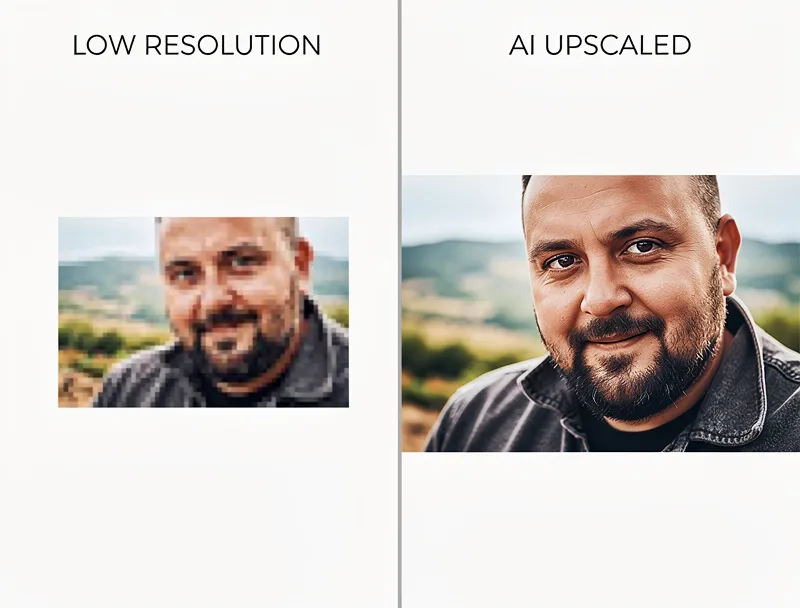
Real AI upscaling vs. fake sharpening. Sharpening just boosts edge contrast. It makes photos look crisper but doesn't add detail — and overdone sharpening creates ugly halos. Real AI enhancement uses neural networks trained on millions of image pairs to reconstruct missing detail, not fake it.
No quality loss on download. Some tools enhance the preview but compress the download. Check that the tool exports at full resolution without additional compression.
Format support. Your photo might be a JPEG, PNG, HEIC, or WebP. A good enhancer handles all of them without converting everything to a low-quality JPEG.
Speed. If it takes 3 minutes to enhance one photo, that's not a tool — it's a punishment.

Try It Yourself
Upload your image and see the AI enhancement in action. Start with 10 free credits.
How to Enhance a Photo for Free (Step by Step)
Here's the fastest way to enhance any photo without creating an account:
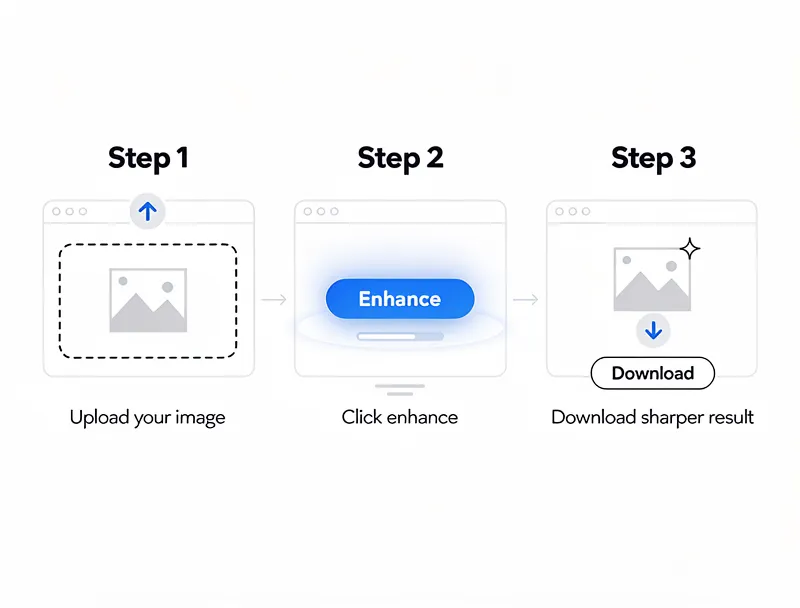
- Go to MyImageUpscaler.com — no signup needed to start
- Drop your image onto the upload area (drag and drop works, or click to browse)
- Choose your scale — 2x is enough for most web use, 4x for print
- Download the enhanced version — full resolution, no watermark
That's it. The AI does the rest.
Free vs. Paid: What's the Difference?
The free tier gets you 10 credits on signup — enough to test the tool properly on real photos. You'll see exactly what the output looks like before committing to anything.
Paid plans unlock:
- Higher credit limits for batch processing
- Priority processing during peak hours
- Access to specialized models (face restoration, anime upscaling)
For casual use — fixing a blurry photo, preparing a portrait for print, enhancing a product shot — the free credits are more than enough.
Which Photos Benefit Most from AI Enhancement?
AI photo enhancement works best on these types of images:
Old scanned photos. Grain, fading, and JPEG artifacts from a flatbed scanner respond well to AI restoration. The model fills in damaged areas rather than just blurring them out.
Screenshots and app captures. These are often captured at low DPI and look terrible when printed or displayed at larger sizes. AI enhancement reconstructs the fine details.
Product photos. Small product images get cropped and resized across e-commerce platforms. Enhancing before upload means your listing image stays sharp even in thumbnail. See our guide on AI photo enhancement for product images for more on this.
Portraits. Skin texture, hair detail, and eye sharpness are all areas where AI adds back the detail that low-resolution cameras or compression removed.
See the Difference
Experience crystal-clear upscaling that preserves text, logos, and fine details.
FAQ: Free AI Photo Enhancer
Is MyImageUpscaler really free to use? Yes — you can try the enhancer without creating an account. Guest access gives you immediate results. Signing up (free) adds 10 credits for additional enhancements.
Does it add a watermark to free downloads? No. Downloads are always watermark-free, regardless of whether you're on the free tier or a paid plan.
What file formats are supported? JPEG, PNG, WebP, AVIF, HEIC, TIFF, and BMP. Most image formats work without any conversion step.
What's the maximum file size? Up to 25MB per image on free. Paid plans raise this limit.
Can I enhance multiple photos at once? Batch processing is available on paid plans. Free tier handles one photo at a time.
How does AI enhancement differ from Photoshop's upscale? Photoshop's bicubic upscale algorithm just interpolates pixels — it makes images bigger but doesn't add real detail. AI enhancement uses neural networks trained on high-resolution images to reconstruct missing information. The results look sharper because the model is predicting what the detail should look like, not averaging existing pixels.
Is there a limit on how much I can upscale? Up to 8x upscaling is available. For most photos, 2x–4x gives the best results without over-processing.
Conclusion
Free AI photo enhancement has gotten genuinely good. You don't need expensive software or a subscription to fix a blurry photo or prepare an image for print.
Try the free AI photo enhancer now — no account needed, no watermarks, results in seconds.
Frequently Asked Questions
Quick answers for this guide
What should I know about free AI photo enhancer online — no sign up required []?+
Enhance photos online for free without signing up. No watermarks, instant results. Best free AI photo enhancer tools compared — try it now. Start with the highest-quality source file available, choose the smallest upscale factor that meets your target size, and inspect the result at 100% before publishing or printing.
When should I use AI upscaling for this workflow?+
Use AI upscaling when the original image is too small for the target use case but still has enough detail to guide the model. For guides work, pay closest attention to source image quality, upscale settings, output dimensions, and final visual inspection, especially free, AI, photo.
How do I avoid losing quality after upscaling?+
Upscale once from the best original, avoid repeated compression, keep important text and edges sharp, and export in a format that matches the final use. If the output shows halos, smeared texture, or distorted text, reduce the upscale factor or use a cleaner source image.

Reviewed byJoao Furtado
AI Image Upscaling Specialist
Joao is the founder of MyImageUpscaler and an AI image upscaling specialist. He tests every guide against real upscaling workflows — comparing model outputs, evaluating sharpness and artifact tradeoffs, and validating tool recommendations before publication.
- AI image upscaling
- Model comparison
- Photo restoration
- E-commerce image prep